Case study · Content systems
From documents to a
reusable content model.
A lesson can become a slide deck, a set of instructor notes, and a web resource. I designed a system that gives those outputs a shared, structured source.
- My contribution
- Data modeling, workflow design, implementation
- Core idea
- Preserve the source. Record the decisions. Generate the outputs.
An anonymized account of a curriculum tooling project. All examples and diagrams on this page are illustrative.
- 01 / Ingest
Source document
Text, equations, images,
and teaching notes - 02 / Structure
Canonical lesson
Validated JSON with content references and source provenance
The reusable foundation - 03 / Project
Derived outputs
Editable slide decks
CMS-ready instructor notes
Splits, note assignments, and inserted notes are recorded separately and applied when building an output.
01 / The problem
Structured-ish.
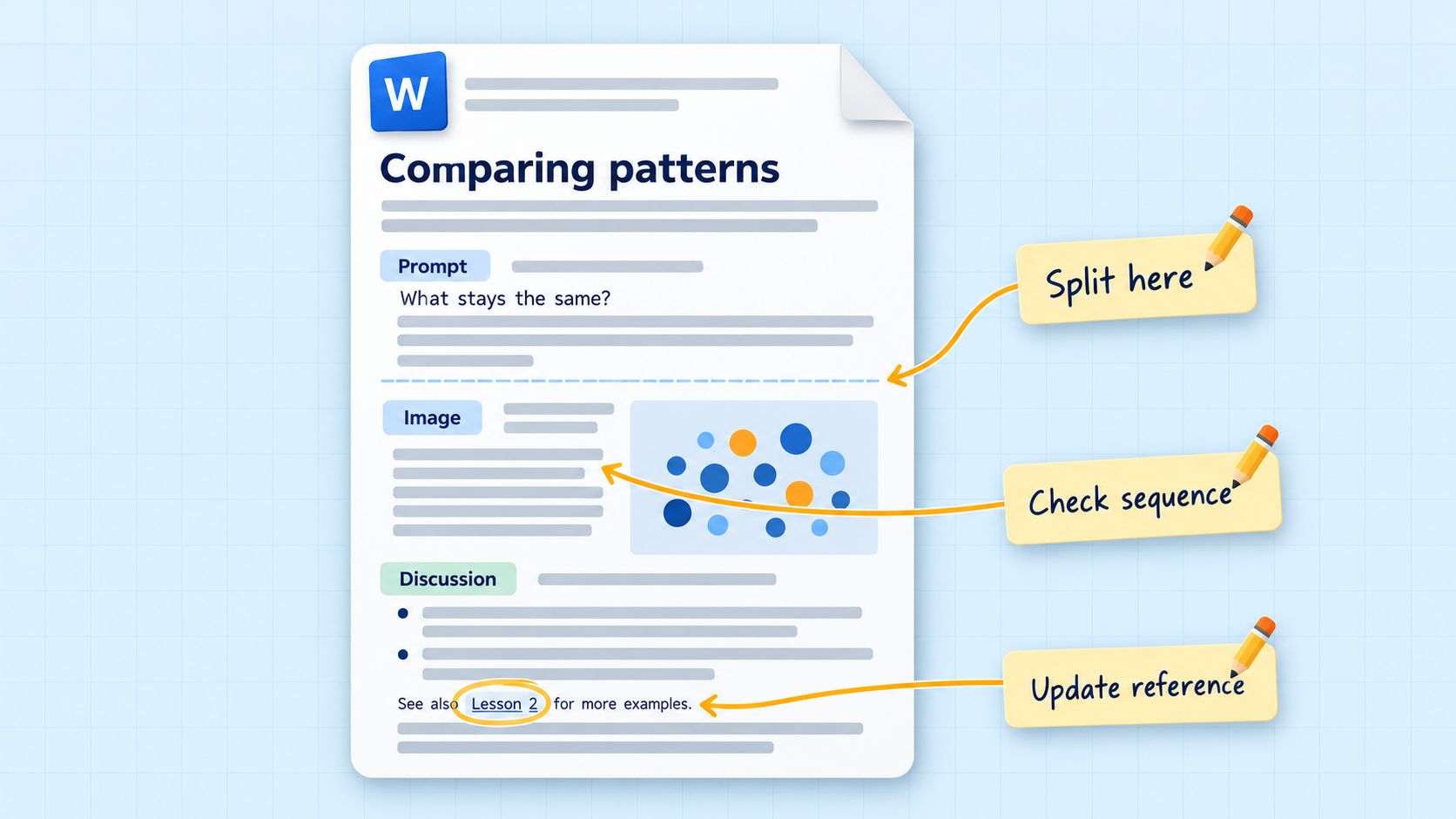
The author’s raw lesson plans already had structure: a sequence of ideas, content intended for slides, and notes for the instructor. But that structure still needed editorial review. Preparing a lesson could mean splitting content across slides, reordering ideas for clarity, or updating references.
Doing that work manually across documents, slide decks, and a content management system would take substantial time and effort, with plenty of opportunities for mistakes. I wanted to capture the structure that was already there and give an editor a clear place to review and refine it, while the system handled the repeatable work of producing outputs.
02 / Data design
Give each kind of information a home.
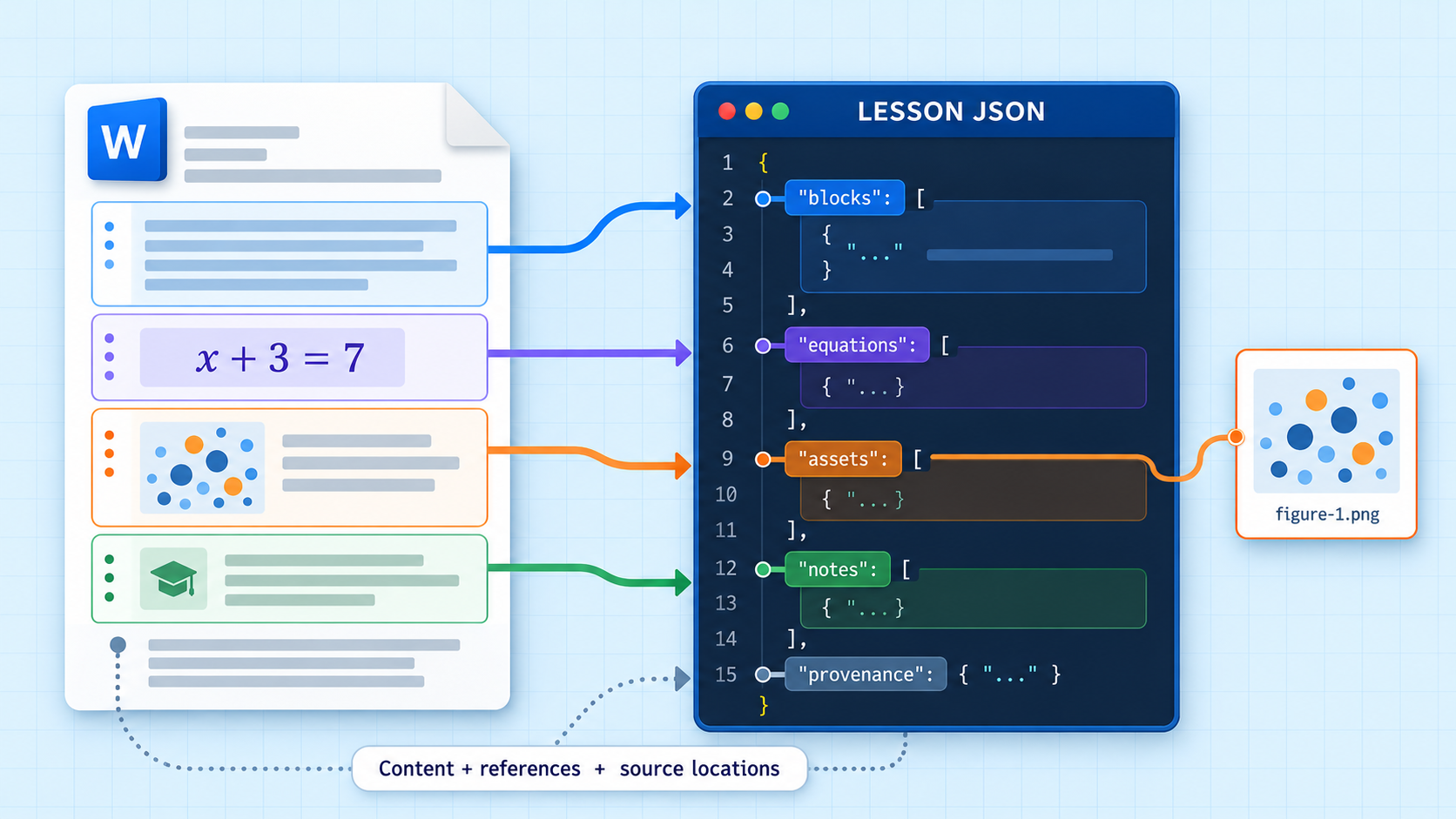
I designed a canonical lesson model: a shared representation of the source that does not depend on any one output format. Python parses the Word document into validated JSON; the model organizes content, teaching notes, and asset references.
- Structure before layout
- Content blocks and their relationships are explicit. Slide numbering and presentation layout belong to a derived layer.
- Preserve rich material
- Equations retain their original editable representation, with additional renderings for other destinations. Images are stored separately and referenced by content-based identifiers.
- Keep a path back to the source
- Provenance records where content came from. Parsing warnings make uncertain interpretations visible for review.
A small example
One source. A different teaching sequence.
An editor wants a question to appear before its image, with the discussion on the second slide.
Compare the two patterns.
● ● ●● ●
● ●
● ●
Discussion: What stays the same?
- Split before the image.
- Assign the discussion to the second slide.
The source blocks stay intact.
Look inside the data model
Invented content and a simplified schema, shown to explain the separation between lesson data and editorial operations.
{
  "lesson": {
    "id": "example-lesson",
    "blocks": [
      {
        "id": "prompt-a",
        "type": "paragraph",
        "text": "Compare the two patterns."
      },
      {
        "id": "image-a",
        "type": "image",
        "asset": "image-reference"
      },
      {
        "id": "note-a",
        "type": "discussion",
        "text": "What stays the same?"
      }
    ],
    "provenance": {
      "document": "example.docx",
      "paragraphs": [
        4,
        5,
        6
      ]
    }
  },
  "edits": [
    {
      "operation": "split",
      "groups": [
        [
          "prompt-a"
        ],
        [
          "image-a"
        ]
      ]
    },
    {
      "operation": "assign-note",
      "block": "note-a",
      "target": "second-slide"
    }
  ]
}
03 / Workflow design
Keep editorial judgment in the loop.
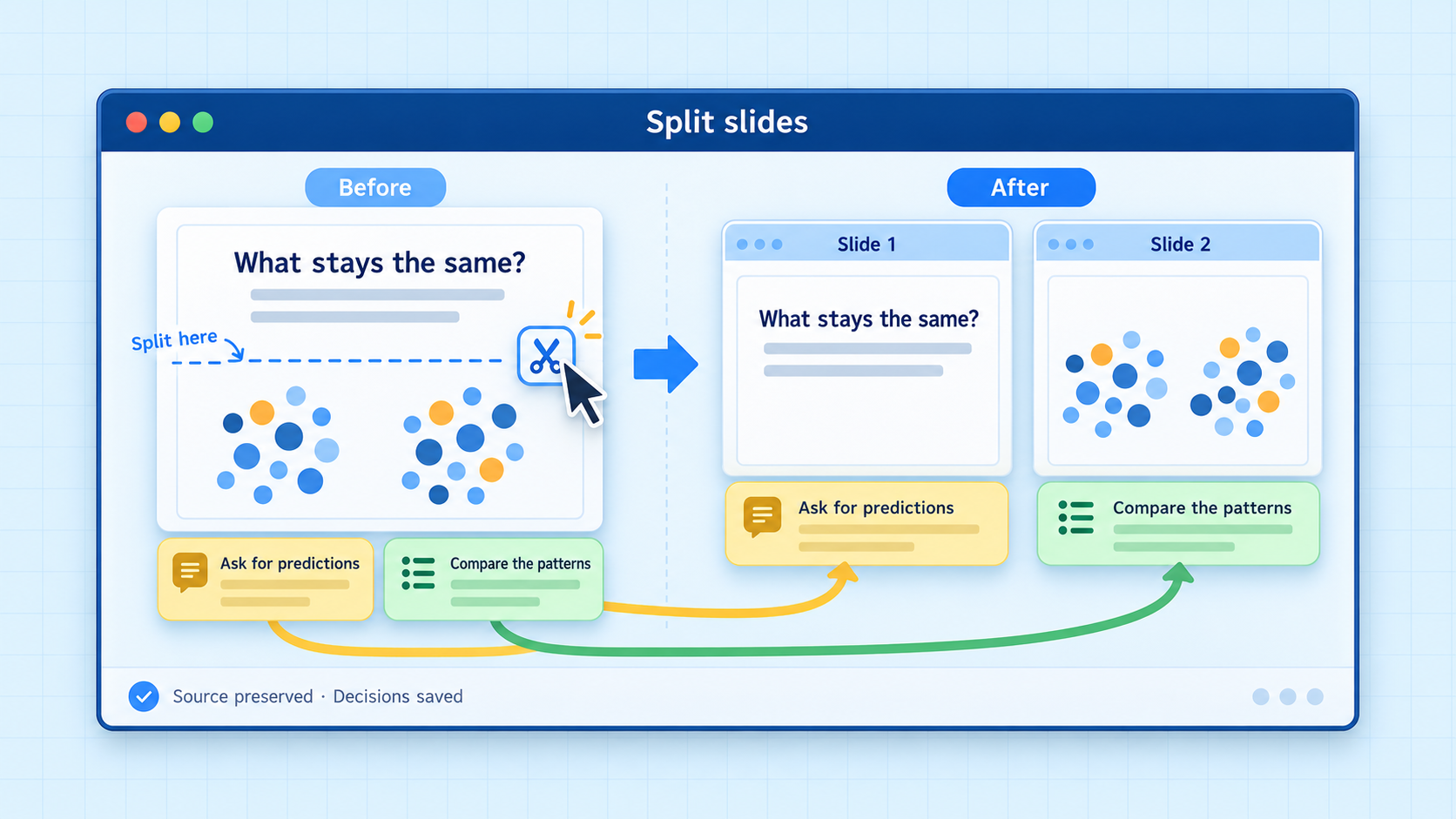
The review interface lets an editor inspect the parsed content, split slides, and align instructor notes with a presentation. When a deck already exists, its slide order becomes the reference for note alignment.
Those choices are saved independently of the parsed source. For a given source and edit log, rebuilding produces the same output. Saved lesson sessions restore the inputs and decisions so work can continue after a restart.
This separation makes the workflow inspectable: the system can show what it read, what the editor decided, and what will be exported.
04 / Tradeoffs
Make uncertainty visible.
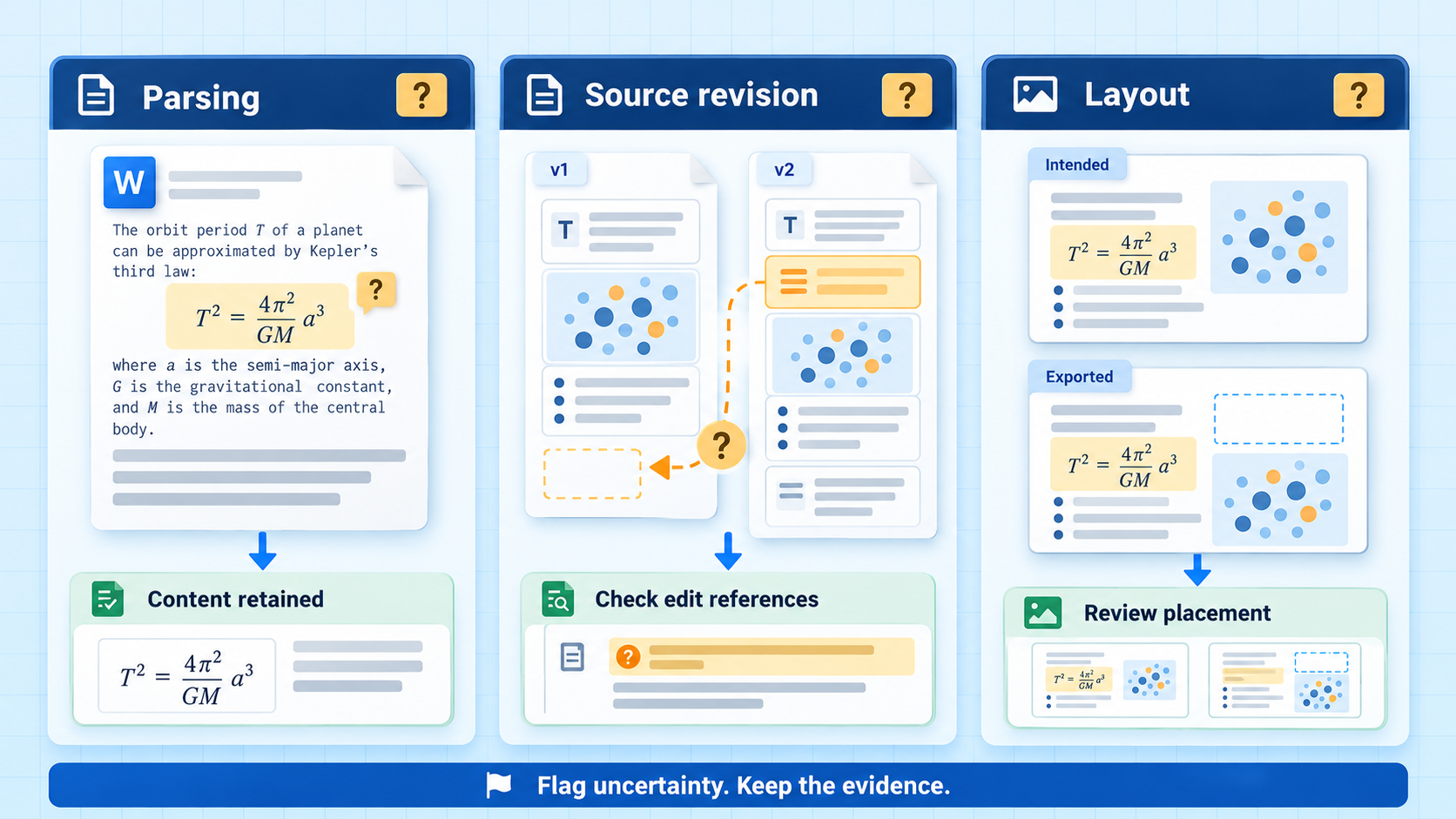
Word documents are not a rigid input format. The parser surfaces ambiguous structure and unsupported equation constructs as warnings, retaining recoverable content for review.
Saved edits refer to blocks in a particular parse. A revised source document can shift those references, so automatic reconciliation across source revisions remains an open design problem. Repeatable output depends on keeping the source version fixed.
PowerPoint export preserves editable math, but automated image placement does not reproduce every detail of a hand-built slide. The system supports editorial review rather than promising identical layouts.
05 / What I built
A reusable foundation for publishing.
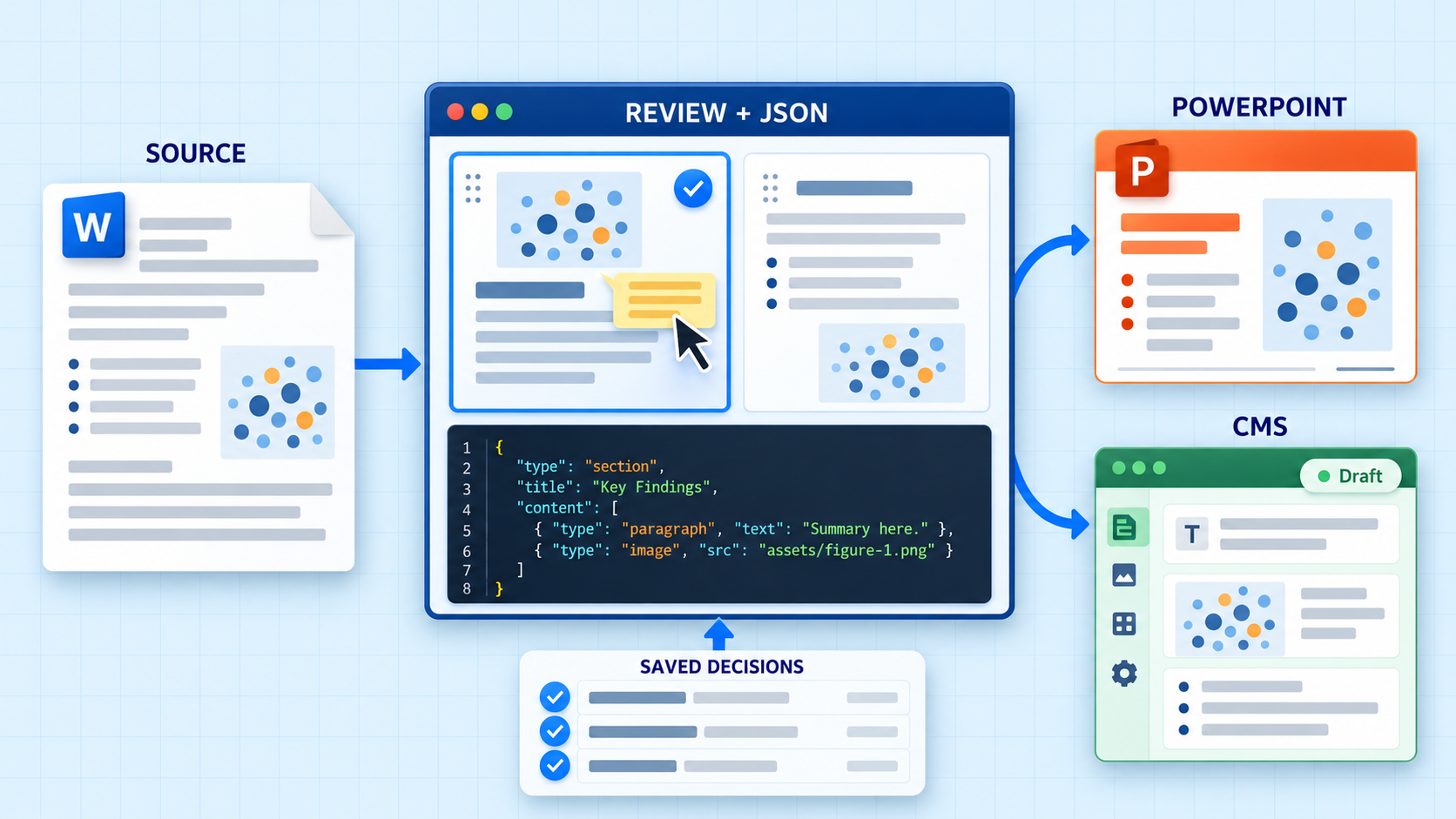
The working system connects document ingestion, structured lesson data, interactive review, and exports to PowerPoint and CMS drafts. Its central contribution is the separation of source content, editorial decisions, and output-specific rendering.
The durable asset is the lesson model. Each output is one way of using it.